Table of Contents
- How to open a small business bank account online: step‑by‑step guide
- Key things to remember when you open a small business bank account online
- Choosing the right bank for your small business
- Documents you’ll need to provide
- Common pitfalls and how to avoid them
- Extra features that can boost your business efficiency
- Maintaining your account after you open it
Starting a business is exciting, but the paperwork that follows can feel overwhelming. One of the first—and arguably most important—tasks is setting up a dedicated bank account for your venture. A separate account not only keeps your personal finances clean, but it also builds credibility with suppliers, customers, and tax authorities.
Fortunately, you no longer need to schedule a trip to a brick‑and‑mortar branch, wait in long lines, or fill out endless paper forms. The digital age has made it possible to open a small business bank account online from the comfort of your home or office, often in just a few minutes. This convenience is especially valuable for solo entrepreneurs, freelancers, and startups that need to move quickly.
In this article we’ll walk you through everything you need to know: why an online account makes sense, how to pick the right financial institution, the documents you’ll need, and the step‑by‑step process to actually get the account up and running. By the end, you’ll feel confident enough to click that “Submit” button and start managing your business cash flow like a pro.
How to open a small business bank account online: step‑by‑step guide
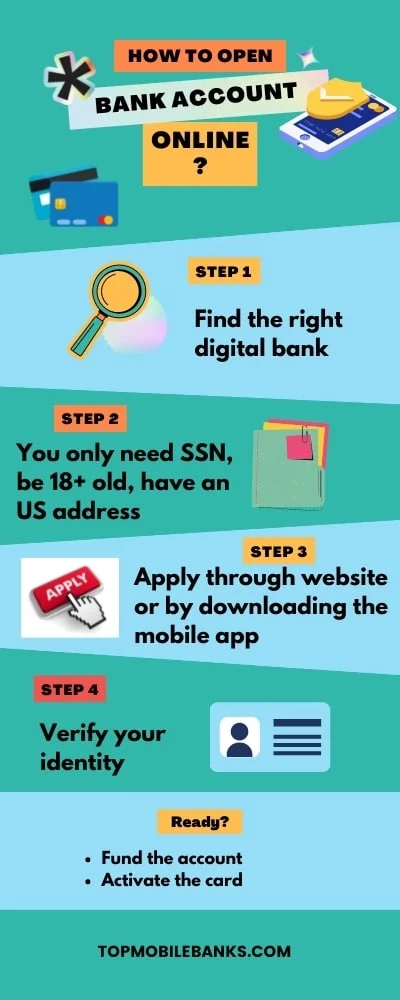
Opening a small business bank account online may sound like a simple click‑through, but a little preparation can save you from headaches later. Below is a practical roadmap you can follow, regardless of whether you run a sole proprietorship, an LLC, or a partnership.
Key things to remember when you open a small business bank account online
- Know your business structure. Banks ask different questions based on whether you’re a sole proprietor, an LLC, or a corporation. Your legal structure determines which forms you’ll upload.
- Gather the required documentation. Most institutions ask for a government‑issued ID, a Tax Identification Number (TIN) or EIN, and proof of address. Some also request your business formation documents.
- Check the fee schedule. Monthly maintenance fees, transaction limits, and ATM surcharge policies can vary widely. Look for accounts that align with your expected transaction volume.
- Consider integration needs. If you use accounting software like QuickBooks or Xero, make sure the bank you choose offers smooth API connections.
Once you’ve ticked those boxes, the actual online application usually follows these steps:
- Visit the bank’s business‑account portal. Most major banks have a dedicated section for new business customers. If you’re not sure where to start, a quick Google search for “open a small business bank account online” plus your location will point you to local options.
- Choose the account type. Decide whether you need a basic checking account, a high‑interest savings account, or a combined “business cash‑management” solution.
- Enter your business information. This includes your legal name, DBA (if applicable), EIN, and the address where you conduct business.
- Upload supporting documents. You’ll typically be asked to attach a photo or PDF of your driver’s license, articles of incorporation, and a recent utility bill.
- Verify your identity. Many banks use a secure third‑party service (like Plaid or Yodlee) to confirm your identity instantly.
- Review fees and terms. Before you click “Submit,” double‑check the fee schedule and any minimum balance requirements.
- Fund the account. Most banks let you transfer money from an existing personal account or use a debit card to make an initial deposit.
- Set up online banking tools. After approval, you’ll receive login credentials. Take a moment to enable two‑factor authentication, set up alerts, and link your accounting software.
That’s it! In many cases, you’ll receive a virtual debit card within minutes, and a physical card will be mailed to you within a week. From there, you can start accepting payments, paying vendors, and tracking expenses all in one place.
Choosing the right bank for your small business
Not all banks are created equal, especially when it comes to digital experiences. Here are a few criteria to keep in mind while you search for the perfect fit.
- Ease of onboarding. Some banks have a fully automated verification process, while others still require a phone call or a mailed signature. If speed is essential, prioritize platforms with instant ID checks.
- Fee transparency. Look for a clear, flat‑rate monthly fee (or none at all). Hidden charges for ACH transfers or wire fees can quickly add up.
- Integration capabilities. If you use payroll services, e‑commerce platforms, or invoicing tools, make sure the bank’s API can sync without manual data entry.
- Customer support. Even with a smooth online setup, you might need help later. Choose a bank that offers live chat, phone support, and a robust help center.
- Physical presence (optional). Some entrepreneurs still appreciate the option to visit a branch for cash deposits or specialized services. If that’s important, pick a bank with a decent branch network.
For a deeper dive into entity‑specific accounts, you might want to read our guide on how to open a sole proprietorship bank account online. The steps are similar, but there are a few nuances around personal vs. business tax IDs.
Documents you’ll need to provide
The exact list can vary, but most banks ask for the following when you open a small business bank account online:
- Personal identification. A driver’s license, passport, or state ID.
- Employer Identification Number (EIN). This is the business equivalent of a Social Security number. If you’re a sole proprietor without employees, your SSN often suffices, but an EIN looks more professional.
- Business formation paperwork. Articles of incorporation, partnership agreement, or DBA registration, depending on your structure.
- Proof of address. Utility bill, lease agreement, or a recent bank statement that shows the business address.
- Operating agreement (for LLCs). Some banks request this to confirm the members and ownership percentages.
If you’re an LLC, you’ll find our business bank account for LLC online: a complete guide especially useful. It walks you through the extra steps that LLCs often encounter, such as uploading the certificate of good standing.
Common pitfalls and how to avoid them
Even with a smooth digital process, a few missteps can cause delays:
- Mismatched information. Ensure the name and address you enter match exactly what appears on your formation documents. A single typo can trigger a manual review that adds days.
- Missing EIN. Some entrepreneurs skip the EIN because they think it’s optional for a sole proprietorship. While you can use your SSN, an EIN keeps your personal credit separate and looks more legitimate to vendors.
- Ignoring fee structures. A “no‑monthly‑fee” account might charge $0.25 per transaction after a certain limit. Calculate your expected volume before committing.
- Not setting up security. Enable two‑factor authentication immediately. A weak password is an open invitation for fraud.
- Skipping integration testing. After you link your accounting software, run a test transaction to confirm that data flows correctly. Fixing a broken sync later can be a hassle.
Extra features that can boost your business efficiency
Many online business accounts now come with tools that go beyond simple checking:
- Instant invoicing. Some banks let you generate and send invoices directly from the dashboard, with the payment link embedded.
- Cash‑flow forecasting. AI‑driven analytics can predict upcoming shortfalls based on historical spend patterns.
- Multiple user access. Grant limited permissions to an accountant or a bookkeeper without sharing your main login.
- Virtual debit cards. Perfect for online purchases or subscriptions; you can create a new card number for each vendor.
- Rewards programs. Certain accounts offer cash back on office supply purchases or travel expenses—useful if you’re frequently on the road.
If you prefer a quick, no‑frills approach, check out our easy business bank account to open – a simple guide for entrepreneurs. It highlights a few fintech platforms that specialize in rapid onboarding and low fees.
Maintaining your account after you open it
Setting up the account is only half the battle. Keeping it healthy ensures you avoid unnecessary fees and maintain a good relationship with your bank.
- Monitor balances regularly. Most banks offer real‑time notifications for low balances, large withdrawals, or unusual activity.
- Keep records organized. Use tags or categories in your online banking portal to separate payroll, inventory, and marketing expenses.
- Stay compliant. File any required reports (like the IRS Form 1099‑NEC) on time to avoid penalties.
- Review fees annually. As your business scales, you might qualify for a premium account with lower transaction costs.
- Leverage customer support. If you notice a discrepancy, most banks resolve issues within 24‑48 hours when you contact them via chat or phone.
Finally, remember that your business bank account is a living financial tool. As your venture grows, you may need to upgrade to a more robust cash‑management solution, add merchant services, or open a separate account for foreign currency transactions. Keeping an eye on your evolving needs will help you make those transitions smoothly.
Whether you’re a freelancer turning a side hustle into a full‑time gig, a startup founder seeking venture capital, or a brick‑and‑mortar retailer expanding online, the ability to open a small business bank account online is a game‑changer. The process is now streamlined, secure, and designed for busy entrepreneurs who value speed and simplicity.
Take the first step today: pick a bank that matches your business goals, gather your documents, and follow the step‑by‑step guide outlined above. Within a few clicks, you’ll have a professional financial hub ready to power your next big move.