
Table of Contents
- How to Open a Business Bank Account Online: The Full Process
- Step 1: Gather Required Documents
- Step 2: Choose the Right Bank or Fintech Platform
- Step 3: Fill Out the Online Application
- Step 4: Set Up Security Features
- Step 5: Fund the Account and Start Using It
- Key Considerations When You Open a Business Bank Account Online
- Legal Entity Compatibility
- International Transactions and Currency Needs
- Future Credit Access
- Integration with Accounting Software
- Regulatory Compliance and FDIC Insurance
- Common Mistakes to Avoid
- Skipping the Fine Print on Fees
- Using the Same Personal Email for Business and Personal Accounts
- Neglecting to Update Business Information
- Overlooking Transaction Limits
- Real‑World Example: From Startup to Fully Funded Business
- Tips to Streamline the Online Opening Process
- Prepare a Checklist Before You Start
- Use a High‑Quality Scanner or Phone Camera
- Leverage Customer Support Early
- Take Advantage of Introductory Offers
- Keep Your Personal and Business Finances Separate
Starting a new venture or moving an existing business to a digital‑first world means you’ll soon face the question: where do I keep my money? The answer is usually a business bank account, but the old‑school approach of driving to a branch and waiting in line just doesn’t cut it anymore. Fortunately, you can open a business bank account online in just a few clicks, saving time, money, and a lot of hassle.
In this article we’ll walk through everything you need to know – from the documents you’ll need, to the security checks banks perform, and the subtle differences between traditional banks and fintech‑only providers. Whether you’re a solo‑preneur, a partnership, or a growing LLC, the steps are largely the same, and you’ll walk away with a clear roadmap to get your finances up and running.
How to Open a Business Bank Account Online: The Full Process
Even though the process is digital, it mirrors the traditional application in many ways. The main advantage is speed and convenience: you can complete the entire workflow from your laptop or smartphone, often within 24‑48 hours. Below is a high‑level view of the journey.
Step 1: Gather Required Documents
- Business formation documents – Articles of Incorporation, Operating Agreement, or Partnership Agreement.
- Employer Identification Number (EIN) – Issued by the IRS; this is the tax ID for your business.
- Personal identification – A government‑issued ID (driver’s license, passport) for each principal owner.
- Proof of address – Utility bill or lease for the business location (or a personal address if you’re a home‑based business).
- Ownership structure details – Names and percentages of ownership for each member.
Having these files scanned and ready as PDFs or high‑resolution images will keep the online portal moving smoothly.
Step 2: Choose the Right Bank or Fintech Platform
Not all banks are created equal. Traditional banks often provide robust cash‑management tools, but they may charge higher monthly fees. Fintech challengers like Mercury, Brex, or Novo usually offer fee‑free structures, integrated invoicing, and APIs for developers. Compare the following factors before you decide:
- Fee structure – Monthly maintenance, transaction, and wire fees.
- Integration capabilities – Does the platform sync with QuickBooks, Xero, or your e‑commerce store?
- Credit options – Some fintechs bundle lines of credit or credit cards with the account.
- Customer support – 24/7 chat vs. branch‑only assistance.
If you’re still unsure, check out this how to open a business bank account online – a complete guide for a deeper comparison of the top providers.
Step 3: Fill Out the Online Application
The actual application typically follows these steps:
- Enter basic business information (legal name, DBA, EIN).
- Upload the documents you gathered in Step 1.
- Provide personal details for each owner (SSN, DOB, address).
- Answer compliance questions (e.g., industry type, expected monthly volume).
- Review and accept the terms of service.
Most platforms will run an instant verification of your EIN and identity through third‑party services like LexisNexis. If everything checks out, you’ll receive a provisional account number within minutes.
Step 4: Set Up Security Features
Security is non‑negotiable when you’re handling business cash online. After your account is approved, you’ll be prompted to:
- Enable two‑factor authentication (2FA) – preferably via an authenticator app.
- Set up role‑based access – give employees limited permissions if needed.
- Configure transaction alerts – email or SMS notifications for large withdrawals.
Some banks also offer virtual cards that you can generate for one‑time online purchases, reducing exposure of your primary debit card number.
Step 5: Fund the Account and Start Using It
Once your account is live, you can fund it in a few ways:
- Wire transfer from another bank.
- Deposit a check using the mobile app’s photo capture feature.
- Link an external personal account for ACH transfers.
After the initial deposit, you’ll be able to order checks, set up payroll, and integrate payment processors like Stripe or PayPal.
Key Considerations When You Open a Business Bank Account Online
Legal Entity Compatibility
Some fintechs only support corporations and LLCs, while they might reject sole proprietorships without a DBA. Double‑check the eligibility list on the provider’s website before you start the application.
International Transactions and Currency Needs
If your business deals with overseas clients, look for a provider that offers multi‑currency accounts or low‑cost foreign exchange. Traditional banks often have higher FX spreads, whereas platforms like Wise (formerly TransferWise) integrate smoothly with many business accounts for cheaper cross‑border payments.
Future Credit Access
Even if you don’t need a loan today, having a solid banking relationship can make it easier to qualify for a line of credit later. Some digital banks automatically evaluate your transaction history and may extend credit without a formal application.
Integration with Accounting Software
A seamless data flow to your bookkeeping system reduces manual entry and errors. Most major providers have native integrations with QuickBooks Online, Xero, and FreshBooks. Test the connection during the onboarding stage to ensure everything syncs correctly.
Regulatory Compliance and FDIC Insurance
Make sure the institution is FDIC‑insured (or NCUA‑insured for credit unions). This guarantees that deposits up to $250,000 per owner are protected. For fintechs that partner with a traditional bank, the insurance typically extends to the fintech’s customers as well.
Common Mistakes to Avoid

Skipping the Fine Print on Fees
Even “free” accounts can have hidden charges – for example, inbound wire fees, out‑of‑network ATM usage, or fees for ordering paper checks. Review the fee schedule carefully and ask the support team to clarify any ambiguous items.
Using the Same Personal Email for Business and Personal Accounts
Mixing personal and business communications can cause confusion and may even raise compliance red flags. Create a dedicated business email address (e.g., finance@yourcompany.com) and use it for all banking correspondence.
Neglecting to Update Business Information
When you change your address, add a new partner, or rebrand, update the bank immediately. Failure to do so can lead to account freezes or compliance holds.
Overlooking Transaction Limits
Many online‑only accounts have daily or monthly transaction caps, especially for ACH transfers. If you anticipate high‑volume payouts (e.g., payroll for 100+ employees), verify the limits before committing.
Real‑World Example: From Startup to Fully Funded Business
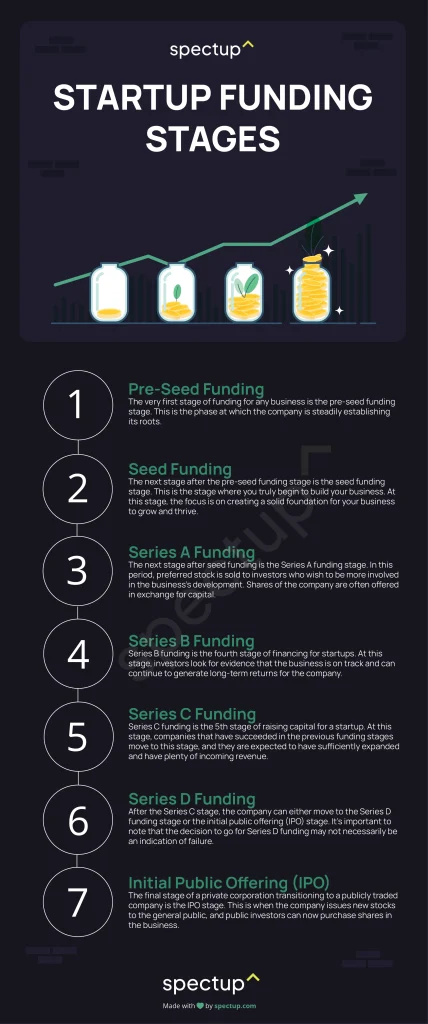
Imagine you’re launching a SaaS startup. You register as an LLC, obtain an EIN, and decide to use a fintech‑focused bank because of its API‑first approach. After gathering your formation documents, you log into the provider’s portal, fill out the online form, and upload PDFs of your Articles of Incorporation and operating agreement. Within two hours, you receive a provisional account number, set up 2FA, and link the account to QuickBooks Online.
With the account funded via a wire from your personal savings, you can now receive subscription payments through Stripe, pay your first employee via direct deposit, and even apply for a credit line based on your monthly recurring revenue (MRR). All of this happened without stepping foot in a physical branch, illustrating the power and convenience of being able to open a business bank account online.
Tips to Streamline the Online Opening Process
Prepare a Checklist Before You Start
Write down every document and piece of information you’ll need. Having a checklist reduces the chance of “Oops, I forgot my EIN” moments that can stall the application.
Use a High‑Quality Scanner or Phone Camera
Blurry scans can cause verification failures. Aim for clear, legible PDFs. Most modern smartphones have built‑in document scanners that produce excellent results.
Leverage Customer Support Early
If you encounter a roadblock—say, a document isn’t accepted—reach out to live chat or phone support right away. Many providers have dedicated onboarding specialists for new business accounts.
Take Advantage of Introductory Offers
Some banks provide cash bonuses for new business accounts (e.g., “Deposit $5,000 and receive a $200 credit”). While tempting, make sure the bonus doesn’t come with restrictive requirements that could cost you later.
Keep Your Personal and Business Finances Separate
Beyond the obvious tax implications, mixing funds can lead to accounting headaches and jeopardize the legal protection of your LLC or corporation. Treat your business account as the sole repository for all company cash flows.
By following these steps and keeping an eye on the common pitfalls, you’ll be able to open a business bank account online with confidence, speed, and the right tools to support your growth.
Once your account is up and running, remember that it’s not a set‑and‑forget element of your business. Regularly review statements, adjust security settings, and explore new features the bank rolls out. A well‑maintained business banking relationship can become a strategic asset, powering everything from cash flow management to credit expansion.
Good luck on your entrepreneurial journey, and may your digital banking experience be as smooth as the click of a “Submit” button.